Choosing the right slicing software is critical for successful resin 3D printing. The slicer translates a 3D model into layer-by-layer instructions that the printer can execute. Chitubox and PreForm Slicer are the two dominant slicers, but they serve different segments of the market. Chitubox is the industry standard for the vast array of third-party LCD/MSLA printers, while PreForm is seamlessly integrated into the high-end, Formlabs-optimized system.
What is Chitubox?
Chitubox is a widely adopted, multi-platform slicing software developed by CBD-Tech. It is the dominant software solution for the budget and mid-range resin 3D printing market, supporting nearly all non-proprietary MSLA (LCD) printers, such as Elegoo, Anycubic, and Phrozen, among others. It functions as an all-in-one preparation tool for model orientation, support generation, hollowing, and exporting the final sliced file.
What is Preform Slicer?
PreForm is the official, proprietary 3D print preparation software developed by Formlabs to use with their SLA (Form series) and SLS (Fuse series) printers exclusively. It is a highly automated and optimized tool designed to ensure professional-grade reliability and ease of use.
Core Slicing Features in Free Version
The fundamental difference between Chitubox and Formlabs Preform lies in their target hardware and business models. Chitubox offers free and paid versions for a wide array of third-party resin printers, while Preform is a single, free piece of software exclusive to Formlabs machines.
Slicing and Print Control
The free version of Chitubox (Basic) provides users with complete manual control over every printing parameter, including UV exposure time and lifting speed. It makes it highly flexible for any printer, but users need to find and manage the correct settings. When slicing, it uses a single set of parameters for the entire print.
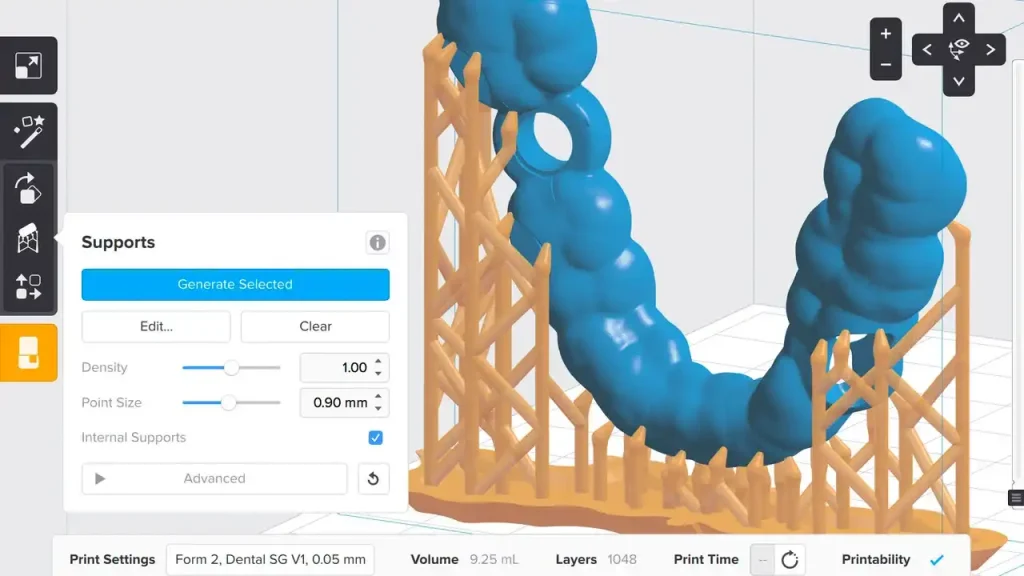
Formlabs Preform is different. Because it is designed for Formlabs printers, the critical print settings are pre-set and locked into resin-specific profiles that have been tested and validated by the company. The user chooses a material, and the software handles the complex settings. Preform also features Adaptive Layer Thickness, automatically using faster & thicker layers where detail isn’t needed and finer layers for complex parts, which is a significant advantage over Chitubox Basic’s single-setting slice.
Support Generation
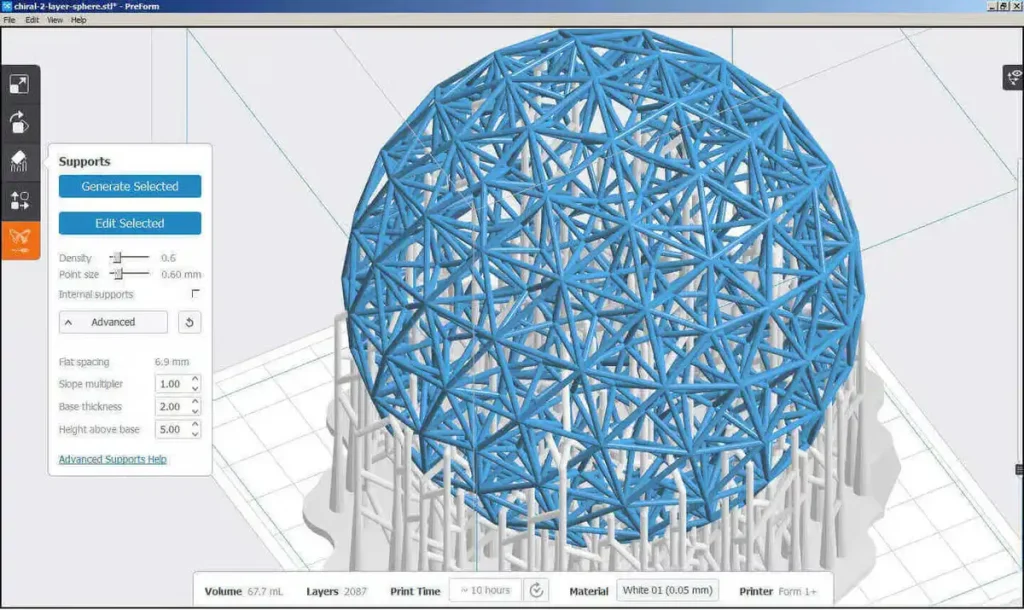
Both programs offer automatic support generation, but Preform’s is generally considered more reliable due to being specifically tuned for Formlabs’ proprietary process. Preform also includes strong print failure detection, checking for areas of suction risk (cups) and weak points (minima).
Chitubox Basic includes an Island Detection feature to spot unsupported sections, but it is the user’s responsibility to review these warnings and manually add supports to prevent print failure. While both offer hollowing, Chitubox Basic requires the user to manually ensure their settings are appropriate for successful prints.
Advanced Features in Pro Subscriptions
The subscription version of Chitubox Pro unlocks advanced capabilities for power users. Its most powerful feature is Multi-Parameter Slicing, which lets users define different print settings (like a faster lift speed or a shorter exposure) for different heights or specific parts of a model. This allows for fine-tuning speed and quality in a single print job.
Chitubox Pro also features stronger tools for preparing models, including advanced mesh repair to fix broken files and Boolean operations to combine or cut models with precision. The support algorithms are also more sophisticated, often leading to better results than the Basic version.
Preform Slicer has no paid “Pro” version. All its advanced, proprietary algorithms, such as validated print settings, intelligent auto-supports, and adaptive layer slicing, are included in the free software. The core idea is that you pay for the Formlabs hardware and resin, and the optimized software is provided as a complete, reliable package.
Printer Compatibility & Resin Profiles
Chitubox has universal printer compatibility, serving as the necessary software for hundreds of third-party LCD/MSLA printers from brands like Elegoo, Anycubic, and Phrozen. Because of this broad compatibility, its resin profiles are community & user-driven. Users can use almost any resin brand but must rely on shared or personally-tested exposure settings.
PreForm Slicer is exclusive and strictly limited to Formlabs SLA and SLS printers like Form 2, 3, 4, and the Fuse series. Its resin profiles are validated, created, and tested by Formlabs. This ensures maximum reliability and consistency, but results in restricting users to Formlabs’ proprietary material library.
Pricing & Subscriptions
The pricing and subscription structures for Chitubox and PreForm slicers are completely different.
Chitubox
Chitubox Basic: It’s the free version. It includes core functionality like model moving, scaling, hollowing, digging, and basic manual and automatic support generation
Chitubox Advanced: It costs $9.99 per month or $79 per year. It unlocks the advanced Support parameters, slicing algorithms, powerful mesh repair, and enhanced model manipulation tools. It gives you high-precision control over preparing individual models.
Chitubox Pro: It costs $16 per month or $169 per year. It includes all the features of the Advanced version and adds features essential for maximizing efficiency. The key additions are Batch Support Placement (allowing you to automatically place supports across multiple models simultaneously) and the most powerful version of the Multi-Parameter Slicing tool, which is critical for complex, high-volume work.
Preform
It is completely free, with no licenses, no annual fees, and no installation limits. It operates on an ecosystem model. Formlabs provides the software free of charge to complement the purchase of their professional 3D printers and proprietary resins. All its powerful and automated features, like advanced auto-orientation and support generation, are available to every user at no cost.
Pros & Cons of Chitubox
| Pros | Cons |
|---|---|
| Supports a massive range of printers from nearly every budget and mid-range resin brand | It uses a proprietary file format like .ctb or .cbddlp, meaning the sliced file cannot be used in a different brand’s slicer. |
| Chitubox Basic is free and offers all the essential tools (hollowing, support generation, model manipulation, anti-aliasing) | Advanced features, like advanced repair, batch processing, etc., are locked behind paid subscriptions |
| Advanced and Pro offer exceptional fine-grained control over support structures, slicing parameters, mesh repair, and workflow automation | Users need to have knowledge and experience to dial in settings for different resins |
| Excellent support, tutorials, and community-created profiles are widely available. | |
| Regular updates to add new printer profiles and features |
Pros & Cons of PreForm Slicer
| Pros | Cons |
|---|---|
| It is perfectly tuned for Formlabs printers and resins. The print profiles and settings are guaranteed to work. | It only works with Formlabs 3D printers. You cannot use it to slice files for an Elegoo, Anycubic, or Phrozen printer. |
| Its support generation algorithms are highly effective, reliable, and produce minimal contact points, which simplifies post-processing and reduces damage to the model’s surface. | It saves files in the Formlabs proprietary .form format, which is not usable by any other brand of printer. |
| One-Click Print feature automatically optimizes orientation, supports, and layout, making it very beginner-friendly and great for high print success rates. | It restricts access to internal printer parameters like laser power, exposure settings, etc. |
| It’s completely free to download and use, with no subscription. |
Conclusion
Choosing between Chitubox and PreForm Slicer depends on your printer. Choose Chitubox if you prioritize universal compatibility and full manual control. It is the industry standard for nearly all non-Formlabs LCD/MSLA printers, offering a free version with all essential tools and complete parameter control. Choose PreForm if you own a Formlabs printer and prioritize guaranteed reliability and maximum automation. It’s the exclusive, free, and highly optimized software for the professional Formlabs printers. It’s designed to be simple and guaranteed to work, handling all the complicated settings for you.