To successfully print a physical object from a computer file using a resin 3D printer (SLA, DLP, or LCD), two main factors are crucial: the slicing program and the control program. These programs change detailed 3D models into simple, flat-layer images and manage the printer’s physical movements.
Two major choices stand out: Chitubox, the industry leader for slicing files on a desktop, and nanoDLP, a full web-based system designed for remote control and deep customization. Chitubox is generally easier to use and works with more printers right away. NanoDLP provides complete remote control, but it is more complex and requires additional hardware.
What is Chitbux?
Developed by CBD-Tech, Chitubox is the current market-leading slicing application in resin 3D printing. It is designed as a file preparation tool, aiming to take user-created 3D models and prepare them for printing on the vast majority of consumer resin printers.
Its main function is the conversion of standard 3D files (STL or OBJ) into a specialized, layered printer file, which is most commonly delivered in the proprietary .ctb format. The final sliced file is transferred to the printer either by saving it to a USB drive or sending it directly via a network connection if available. Chitubox’s workflow focuses on file preparation before the print job starts.
What is nanoDLP?
NanoDLP is an open-source web controller designed to run on a dedicated host device, such as a Raspberry Pi or a PC server (Windows, Mac, or Linux). This host transforms the device into an all-in-one control platform for 3D printers.
Instead of using a desktop application, you access the nanoDLP interface, including the slicer and job manager, through a web browser on any connected device. It gives advanced users direct control over the printer’s mechanical components, such as the Z-axis motor, UV light exposure, and layer timings. It makes it an excellent choice for custom-built or modified printers.
Core Slicing Features in Free/Basic Version
Both applications include the essential tools necessary for basic model preparation, such as rotation, scaling, hollowing, and creating basic infill structures. However, they differ significantly in quality and strength.
Common Functionality
Both applications offer the standard set of tools essential for general model preparation, including rotation, scaling, hollowing, and the creation of basic infill structures. You will find the workflow for these basic tasks quick and efficient on both platforms.
Chitubox Basic Strengths
Chitubox Basic provides highly functional automatic and manual support generation features. It is also excellent at detecting small, unsupported areas (islands), which greatly reduces the risk of failure. It also implements anti-aliasing to smooth the pixelated edges on curved surfaces, leading to visibly cleaner surface finishes in the free version.
NanoDLP Basic Limitations
NanoDLP’s main slicing tool works well enough, but its overall quality is generally not considered top-of-the-line. Because its basic slicer often misses the tools for smoothing edges (anti-aliasing) that Chitubox has. You need to clean up their 3D models in other software before importing them to get the best-looking results.
Advanced Features in Pro/Premium Subscriptions
The difference between the two platforms becomes very clear when looking at their advanced features.
Chitubox Pro
Enhanced Support & Repair
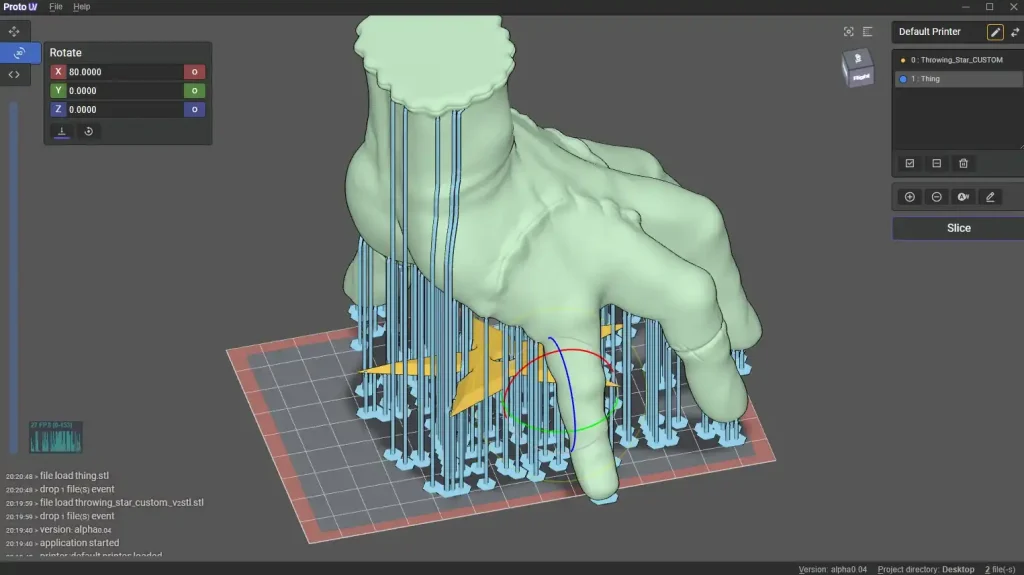
Its Pro unlocks advanced support algorithms. It offers multiple support types, automatic reinforcement to maximize print success rates, and specialized tools for manual mesh repair and correcting geometry errors in models.
Slicing Optimization & Tools
Its Pro version allows for multi-parameter slicing, allowing you to apply different exposure settings to various sections of a single model for precise print control. This feature is critical for optimizing prints, allowing for longer & stronger base exposures while using faster, more accurate exposures for the main body of the model.
Other advanced features include detailed volume and cost calculation, highly accurate print time simulations, and the ability to generate complex lattice and honeycomb infill structures for hollowing.
NanoDLP Control & Execution
Direct Firmware-Level Control
NanoDLP’s advanced features revolve around deep & fine-tuned control over the printer’s execution. You gain direct access to hardware parameters through the web interface, including motor acceleration curves, movement speeds, and precise UV exposure settings.
Scripting & Masking Tools
NanoDLP allows for direct G-code control and custom scripting, allowing you to modify the machine’s start, end, and layer-shift sequences, offering control down to the machine command level. It also provides highly customizable masks and blackout features, giving you unique control over light distribution and plate management.
Remote Management
Its remote management features include live video streaming from connected camera feeds and the ability to stop, pause, or remotely modify settings of a print job mid-process from any networked device.
Printer Compatibility & Resin Profiles
Chitubox Printer Compatibility
Printer Compatibility: It’s the required slicing software for almost every major brand of commercial LCD/MSLA resin printer, including popular models from Elegoo, Anycubic, and Phrozen.
Resin Profile: Chitubox has official, tested settings for many types of resin (called the Resin Material Alliance, or RMA). These standard settings help guarantee good prints without you needing to do a lot of testing.
NanoDLP
Printer Compatibility: NanoDLP is mainly for custom-built, do-it-yourself (DIY), and older printers. It’s the best choice for building or modifying printers, but setting it up needs more technical skill to connect to the printer’s parts.
Resin Profile: You have to create and manage most of the resin settings yourself. It matches its open design, which is great for custom control boards.
Pricing & Subscriptions Structure
Chitubox comes with a freemium version with two subscription plans, while nanoDLP is free software.
Chitubox Advanced: It costs about $9.99 per month or $79 per year. It gives you improved support generation, better slicing math, mesh repair, and model adjustment tools.
Chitubox Pro: It costs about $16 per month or $169 per year. It includes everything in Advanced, plus batch support placement and the powerful multi-parameter slicing tool.
NanoDLP: It’s completely free and open-source. The only cost is for the hardware you need to run it, such as a Raspberry Pi or custom control board.
Pros & Cons of Chitubox
| Pros | Cons |
|---|---|
| Native support for the most popular resin 3D printers | Many advanced features are locked behind the pro subscription |
| The basic version includes all necessary slicing and model preparation features for beginners at no additional cost. | It creates files in .ctb, .cbddlp, etc. formats that are specific to Chitu-base printer boards. |
| The pro version has powerful tools like advanced model repair, multi-parameter slicing, better anti-aliasing, enhanced support generation, etc. | It’s a desktop-only application, unlike nanoDLP, which is web-based. |
| Includes reliable hollowing tools, drainage hole placement, and infill patterns. | While you can hollow models, ChiTuBox Basic restricts advanced options, such as easily deleting or filling in holes you’ve already created. |
| Regular updates with new features and has a very large user base for support. |
Pros & Cons of nanoDLP
| Pros | Cons |
|---|---|
| It’s a complete web interface for remote monitoring, control, and slicing, making it great for managing prints from anywhere. | To use it as a standalone controller and to unlock its full potential, you often need additional hardware like a Raspberry Pi or a dedicated NanoDLP board. |
| It’s free to use for end-users. | As rendering happens in the browser, a strong internet connection and a capable device are required for smooth operation. |
| It offers advanced printer control settings like dynamic cure times, custom acceleration, and direct hardware control. | The all-in-one nature and advanced control settings can be challenging for a new user just looking to print |
| Excellent for multi-printer management with a cloud dashboard for monitoring. | As rendering happens in the browser, a strong internet connection and a capable device are required for smooth operation. |
| It can be configured to work with a large number of resin printers and OS like Raspberry Pi, Windows, Max, Linux, etc. |
Conclusion
The choice between Chitubox and nanoDLP is a decision based on prioritizing either software quality or hardware control. Chitubox offers superior software quality for slicing and compatibility with commercial printers. It’s a good choice for casual users or those prioritizing print quality and ease of use with commercial printers. NanoDLP is the better platform for integrated control and deep hardware manipulation. So, it’s good for advanced users, engineers, or custom builders who require deep hardware control, integrated web management, and prefer an open-source platform.